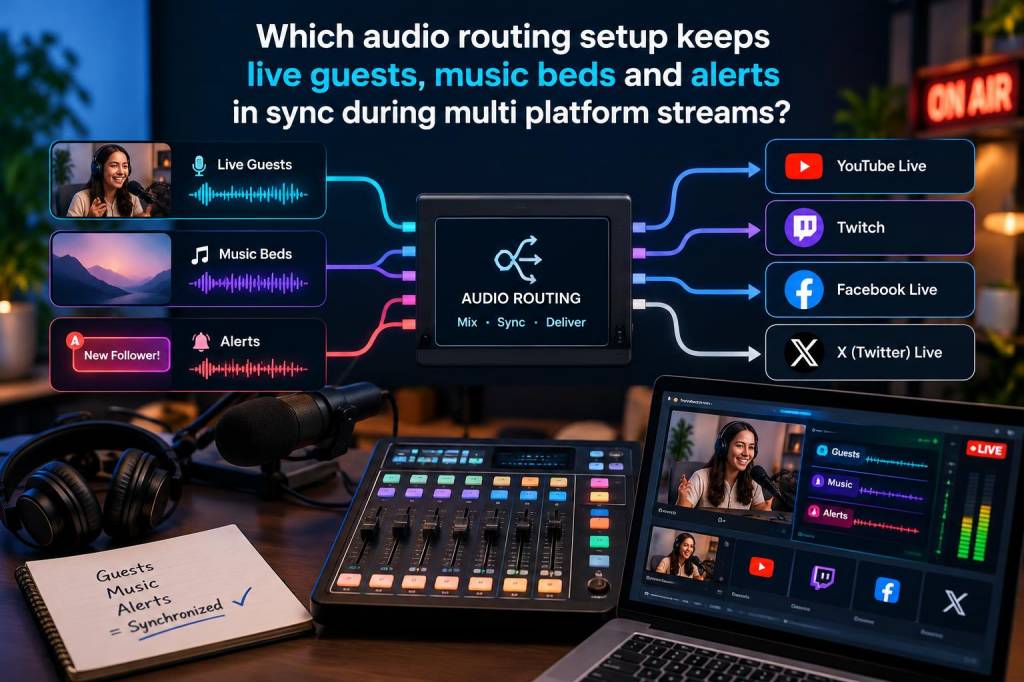
When I set up a live stream with guests, music beds, and alerts across more than one platform, I care less about raw gadget count and more about signal discipline. If each element arrives through a different path with different latency, the whole show starts to feel loose: a guest speaks over an alert, a music bed lands late, or a scene switch sounds clean on one platform and messy on another. My answer is usually a routing setup built around a single master audio path, tight monitoring, and a clear separation between program audio and side-chain sources.
I have tested enough streaming stacks to know that “simple” is not always “limited.” In fact, many of the cleanest live productions I have built use a fairly elegant signal chain: microphones and guest audio enter a mixer or interface, music beds are controlled in software or on a hardware mixer, alerts are managed through a dedicated browser or app audio source, and a final program mix is sent to every platform with as little drift as possible. When that chain is designed well, I can keep live guests, background music, and event alerts aligned without chasing problems during the broadcast.
My first rule: one master clock, one master mix
The most important decision I make is to keep one device or one app responsible for timing and output. That does not mean every source must be forced through a single physical box, but it does mean I want one place where final timing is controlled. In practice, this is often my mixer or my streaming software, depending on the complexity of the show.
If I am running a basic show, I will often use a hardware interface or digital mixer as the master. Guest microphones, local audio, and music enter there first, then a clean output goes into OBS, StreamYard, Restream, or whatever software I am using. If I need more control over visual alerts or browser-based sound events, I will still keep those events synchronized to that master chain rather than letting each platform create its own timing guess.
If I am running a more software-heavy setup, I may use OBS as the master and route everything into it with virtual audio devices, separate tracks, and scene-specific control. In either case, I avoid letting each platform create its own version of the show. Once multiple outputs begin generating independent delays, sync drift becomes much harder to manage.
What usually breaks sync in live multi-platform audio
Most sync problems I see are not caused by one dramatic failure. They happen because several small delays add up. A guest joins through a browser. Music plays from a desktop app. Alerts come from a plugin. Then the stream is sent to two or three platforms, each with its own ingestion path. That is where things get messy.
The most common causes I run into are:
- Guest audio arriving through a different latency path than host audio
- Music beds playing locally while alerts play through browser sources
- Platform-side processing adding compression or delay on one destination
- Automatic audio ducking creating unpredictable shifts
- Bluetooth headphones or wireless monitoring introducing delay during live checks
- Multiple virtual audio drivers fighting for priority on a computer
When I diagnose these issues, I usually start by asking one question: where is each sound source entering the system, and where does it leave? That simple map often exposes the problem immediately.
My preferred routing layout for guests, music, and alerts
My most reliable setup uses three distinct source groups: human voices, ambient content, and system cues. Human voices include host and guest microphones. Ambient content includes music beds, stingers, and room tone if needed. System cues include alerts, countdowns, and any automation sounds that signal an event.
I like to keep voices as direct as possible. If a remote guest is involved, I prefer a platform or tool that can manage communication with predictable latency and stable echo cancellation. Riverside, Zoom, Discord, and OBS.Ninja can all work, but I choose based on the show format. For guest-heavy broadcasts, I want the guest channel isolated enough that I can monitor it, trim it, and balance it without affecting everything else.
Music beds usually stay on a separate fader or software source. That lets me duck them quickly when speech starts, and it also lets me maintain consistent loudness across all platforms. Alerts sit on their own source so I can control their volume independently. I do not want an alert system that shares a path with a guest feed unless I have no other option, because alerts can become either too loud or too late.
In a well-structured setup, my final program mix looks like this:
| Source | Role | Routing choice | Why I use it |
|---|---|---|---|
| Host mic | Main voice | Mixer input or interface input | Lowest latency and strongest control |
| Guest audio | Remote voice | Dedicated software channel | Easy isolation and monitoring |
| Music bed | Background layer | Separate media source or mixer return | Fast ducking and volume management |
| Alerts | System cue | Dedicated browser or app source | Independent timing and gain control |
| Program output | Final stream feed | Single master bus | Consistent timing across destinations |
Why I keep alerts separate from music
Alerts are tiny, but they can cause outsized problems. If a follower alert, donation sound, or membership sting shares the same path as music, it can vanish under the bed or hit too aggressively. I want alerts to cut through without forcing me to lower the entire mix. That is why I keep them on a separate bus or a separate software source whenever possible.
There is another reason too: alert timing matters more than many creators realize. If a viewer triggers an action that should happen instantly, a delayed alert feels disconnected from the audience moment. It can also make the stream feel out of phase when one platform displays the visual event while the audio lands a second later. By isolating alerts, I can tune their buffer and output path without changing my entire show.
What I use for guest handling when timing matters
For guest interviews, I prefer tools that let me control audio independently from video. I want clean monitoring, predictable delay, and the ability to mute or attenuate channels without disrupting the rest of the broadcast. If the guest connection is unstable, I would rather take a small quality trade-off than build a routing system so fragile that every connection glitch becomes a full production issue.
In some cases, I route guest audio through OBS with a separate audio input capture. In others, I bring the guest into a dedicated call platform and monitor it through a local interface. The important part is that I can hear the guest at a stable level before it reaches the program bus. I also keep an eye on echo cancellation. If a guest hears the music bed or alerts too loudly through their return feed, they may speak a split second after hearing themselves, which creates awkward overlap.
My monitoring approach during a live show
I never rely only on meters. I listen in real time on a wired monitoring path whenever I can. Wireless headphones are convenient, but for this kind of work I want the shortest, most predictable monitoring chain available. I also test with short spoken phrases before going live, because spoken consonants reveal sync issues faster than any meter does.
During a live show, I listen for three things:
- Whether speech arrives naturally over music
- Whether alerts land immediately when triggered
- Whether guest voices feel connected to host voice timing
If any of those feels off, I adjust before the problem compounds. I do not wait until the next segment. Small drift can become obvious very quickly once an audience is engaged and the pacing gets faster.
Multi-platform streaming adds one more layer of complexity
When I stream to multiple platforms at once, I have to accept that each destination may process audio a little differently. Some platforms normalize volume. Some add delay for stability. Some compress dynamic range more heavily than others. That means my goal is not perfect identical playback everywhere. My goal is a mix that survives those differences gracefully.
To do that, I keep the source mix conservative. I avoid extreme loudness. I leave enough headroom for alerts. I make sure guest voices are clear without pushing them so hard that platform processing turns them brittle. I also test each destination separately when I can. A mix that feels excellent on one service may feel over-compressed on another, especially if music and speech are competing for space.
If I need absolute consistency, I route everything into a single encoding workflow and then distribute from there. That gives me better control than letting every platform receive a differently shaped version of the stream. It also makes troubleshooting easier, because I am dealing with one program feed instead of several semi-independent audio variants.
A practical signal chain I trust
When I build from scratch, I usually start with this pattern:
- Host mic into mixer or interface
- Guest audio into a dedicated software input
- Music bed into a separate controlled source
- Alerts into their own browser or app channel
- All sources balanced into one program bus
- Program bus sent to streaming software
- Streaming software distributed to each platform
This layout gives me flexibility without turning the session into a maze. It lets me mute one element, adjust another, and preserve the timing relationship between speech, music, and cues. It also makes rehearsal much easier. I can test each layer individually, then test them together, and see exactly where delay enters the chain.
My rule for staying sane during live production
I keep one simple rule in mind: if a sound matters to the audience, I route it as close to the master path as possible. That is why I do not scatter essential audio across random plugins and platform defaults. The more I centralize control, the easier it becomes to keep guests, music beds, and alerts locked together during a live multi-platform show.
That mindset has saved me more times than any single app or piece of hardware. It also keeps the stream feeling intentional, which is what audiences notice first even when they cannot explain why. When the voices land cleanly, the music supports rather than competes, and the alerts appear exactly when they should, the whole broadcast feels tighter, calmer, and far more professional.